
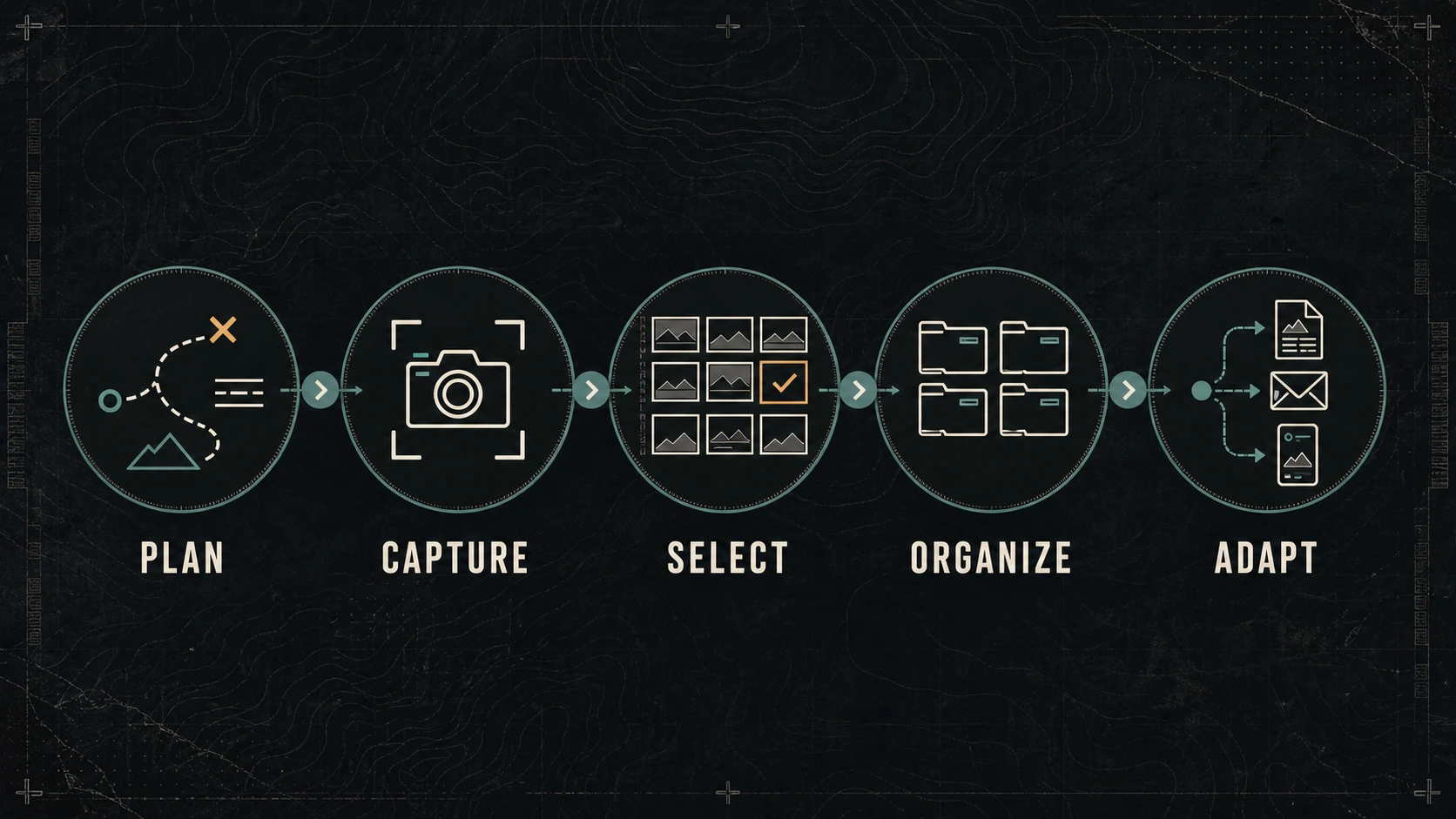
A reusable content shoot begins before anyone picks up a camera. The useful question is not “How much can we capture?” It is “What does the business need to explain, prove, and publish?”
Without that decision, a shoot can produce hundreds of technically good files and still leave the website missing the one horizontal image, process detail, or human moment the page requires.
The goal is a working asset library: original photographs, video, audio, and notes that retain enough context, quality, permission, and organization to support more than one responsible use.
Start With Destinations and Decisions
List the places the material is expected to appear before writing the shot list.
Possible destinations include:
- a service or product page;
- the home or about page;
- a project or work example;
- an article or visual guide;
- an email;
- a proposal or sales presentation;
- a Google Business Profile update;
- or a small set of social posts.
For each destination, identify the viewer’s question and next decision.
| Destination | Viewer question | Useful evidence | Likely format |
|---|---|---|---|
| Service page | Is this right for my situation? | Context, process, limits, result | Horizontal and detail stills |
| Work example | Can this business do the work? | Sequence, conditions, workmanship | Wide, medium, detail series |
| Short video | Why should I learn more? | One clear moment or explanation | Vertical clip with clean audio |
| Proposal | What will the work involve? | Scale, access, materials, process | Horizontal stills with room for labels |
This prevents format requests from becoming the strategy. “We need vertical video” is a technical requirement. “We need to show how the team protects the customer’s space before work begins” is a communication requirement.
The larger seven-stage marketing operating loop can establish the priority and owner before the shoot enters production.
Build Shot Families, Not an Endless Shot List
A strong visual sequence behaves a little like a trail map: context first, then the important junctions and details.
Use five shot families.
Establishing context
Show the environment, scale, location type, or starting condition. The frame should help a viewer understand where the work happens without exposing private information the business does not have permission to publish.
Process
Record the meaningful steps, not every movement. Look for setup, inspection, preparation, decision points, quality controls, handoffs, and cleanup.
Detail
Capture the surfaces, tools, materials, interfaces, labels, or workmanship that support a specific explanation. A detail needs context in the file notes; otherwise a future editor may not know what it proves.
People and interaction
When permission is established, show the people responsible for the work and the way they interact with the environment, process, or customer. Avoid staging actions that misrepresent normal practice.
Outcome and next state
Record the result from angles that can be compared with the starting condition. Do not imply a transformation the images do not support.
For each important scene, capture a useful sequence: wide context, medium action, close detail, and a clean variation with room for page or layout needs. That pattern is more dependable than collecting disconnected “hero shots.”
Plan for Orientation and Safe Crops
The same frame rarely works perfectly everywhere.
Before the shoot, record which uses need:
- wide horizontal space for a website banner;
- a natural landscape frame for an article or proposal;
- vertical composition for short video or mobile-first placement;
- a square-safe crop;
- negative space for adjacent page copy;
- or a clean frame with no text overlay at all.
Do not assume every image should carry words. Text embedded in an image is harder to update and can create accessibility problems. The W3C Images Tutorial distinguishes informative, decorative, functional, and complex images and explains that the text alternative depends on the image’s purpose and context.
Capture for the composition that matters most, then make deliberate variations. Cropping one master file into every shape can remove the subject, scale, or evidence that made the frame useful.
Record Sound and Spoken Context Deliberately
If video is part of the plan, decide whether a clip needs natural sound, a spoken explanation, an interview answer, or no usable audio.
For spoken material:
- write the question or point before recording;
- choose a place where the voice can be understood;
- record a clean beginning and ending;
- avoid unsupported claims made casually on camera;
- and save the speaker’s name, role, and approval status with the asset notes.
Short talking points can become a transcript, caption source, article note, or sales answer. That reuse is responsible only when the context and approval follow the words.
Create a Capture Brief
A compact brief keeps creative work connected to operations.
Include:
| Field | What to decide |
|---|---|
| Business priority | The outcome this material should support |
| Audience | The person or situation the content serves |
| Customer questions | What the viewer needs to understand |
| Destinations | The first approved publishing locations |
| Shot families | Context, process, detail, people, outcome |
| Formats | Horizontal, vertical, square-safe, audio needs |
| Required proof | The claim or explanation each key asset supports |
| Permissions | People, property, customer, music, and usage rights |
| Owner | Who can approve facts and publication |
| Constraints | Safety, privacy, timing, access, brand, or legal limits |
| Backup plan | What happens if weather, access, sound, or timing changes |
The brief should be short enough to use in the field. If it becomes a production manual nobody can scan, it has stopped helping.
Treat Permissions and Ownership as Asset Data
Knowing where a file came from is part of knowing whether it can be reused.
Record:
- creator or photographer;
- capture date and general subject;
- business or project;
- ownership or license;
- people and property releases where applicable;
- approved and restricted uses;
- expiration or review date;
- and any required credit.
The U.S. Copyright Office explains that the person who takes an original photograph is generally its initial copyright owner, while a work-made-for-hire arrangement may produce a different result. Its guidance for photographers is a useful starting point, but contracts and specific rights questions may require legal review.
Do not treat possession of a file as proof of unlimited publication rights.
Organize the Library While Context Is Fresh
Move the material into managed storage promptly. Keep original files separate from edits and exports.
A practical structure might be:
2026-07_project-name/
  01_originals/
    photo/
    video/
    audio/
  02_selects/
  03_edits/
  04_exports/
    website/
    social/
    sales/
  05_notes-rights/
Use filenames that identify the project, subject, sequence, and version without relying on one person’s memory.
20260729_project_process-inspection_wide_001.ext
20260729_project_process-inspection_detail_002.ext
Keep a small asset register with the destination, description, rights, owner, and review status. The Library of Congress’s personal digital archiving resources emphasize file formats and adding descriptions to digital photographs; the business lesson is simple: files remain useful when their context survives.
Maintain more than one copy of important originals, with at least one copy separated from the primary working location. A synced folder can improve availability, but synchronization alone is not the same as a tested recovery plan.
Select for Usefulness, Not Only Beauty
The first selection pass should reject files with technical failures, privacy problems, unclear subjects, missing permissions, or misleading context.
The second pass asks:
- Which customer question can this asset help answer?
- What does the frame prove?
- Is the subject understandable without an internal explanation?
- Does it fit a real destination?
- Can it be cropped without losing the point?
- Is there a stronger or less repetitive alternative?
A photograph can be visually strong and still be wrong for the page. A quieter frame may carry more information, leave better layout space, or show the process more honestly.
Adapt Without Turning Reuse Into Repetition
Reuse the evidence, not necessarily the same edit or caption.
One approved process sequence might become:
- a service-page image with contextual alt text;
- a short article section explaining one quality control;
- a proposal slide showing scope or preparation;
- a social post answering one customer question;
- a short video using three clips and a verified voiceover;
- and an internal reference for future estimates or training.
Each adaptation needs its own purpose, crop, surrounding copy, link, and next step.
Google’s image SEO guidance recommends placing images near relevant text and using descriptive context. That is also good editorial practice: an image becomes more useful when the page explains what the viewer should notice.
Do not publish near-duplicates simply because the library contains them. Reuse should reduce production waste while improving clarity.
A Hypothetical Service-Shoot Plan
Consider a local service business documenting one routine project.
The business needs to:
- Explain who the service fits.
- Show how the site is prepared.
- Demonstrate one inspection or quality-control step.
- Record the completed condition.
- Direct qualified readers to the service page.
The capture plan includes an establishing frame, preparation sequence, two meaningful details, one approved human interaction, final comparison frames, a short spoken answer, and variations for the website and vertical video.
After capture, the team backs up the originals, records permissions, selects only the frames that support the five needs, prepares channel-specific exports, and links every public adaptation back to the approved service information.
The result is not a promised number of posts. It is a small library with known uses and enough context to remain valuable.
Know When to Reshoot
Reuse is not a reason to keep weak or outdated material.
Reshoot when:
- the service, people, location, safety practice, or brand presentation has changed;
- the asset no longer matches the public offer;
- the required permission is missing or withdrawn;
- every useful crop damages the meaning;
- technical quality prevents responsible use;
- or the library lacks the evidence a current customer question requires.
Retire superseded exports while preserving originals and records according to the business’s retention policy.
The Bottom Line
One content shoot becomes reusable when it is planned around decisions, captured as coherent shot families, stored with rights and context, selected for usefulness, and adapted for real destinations.
Start with the pages and questions the business must support. Capture less aimlessly and document more deliberately. A well-managed library should make the next website update, proposal, email, or social post easier without asking the files to prove something they cannot.
Dark Monkey Media connects production planning to practical content systems and digital operations. The local social media planning guide shows how approved visual evidence can support channel-specific posts. If the library already exists but nobody can find, verify, or use it, start with the smallest broken handoff.