
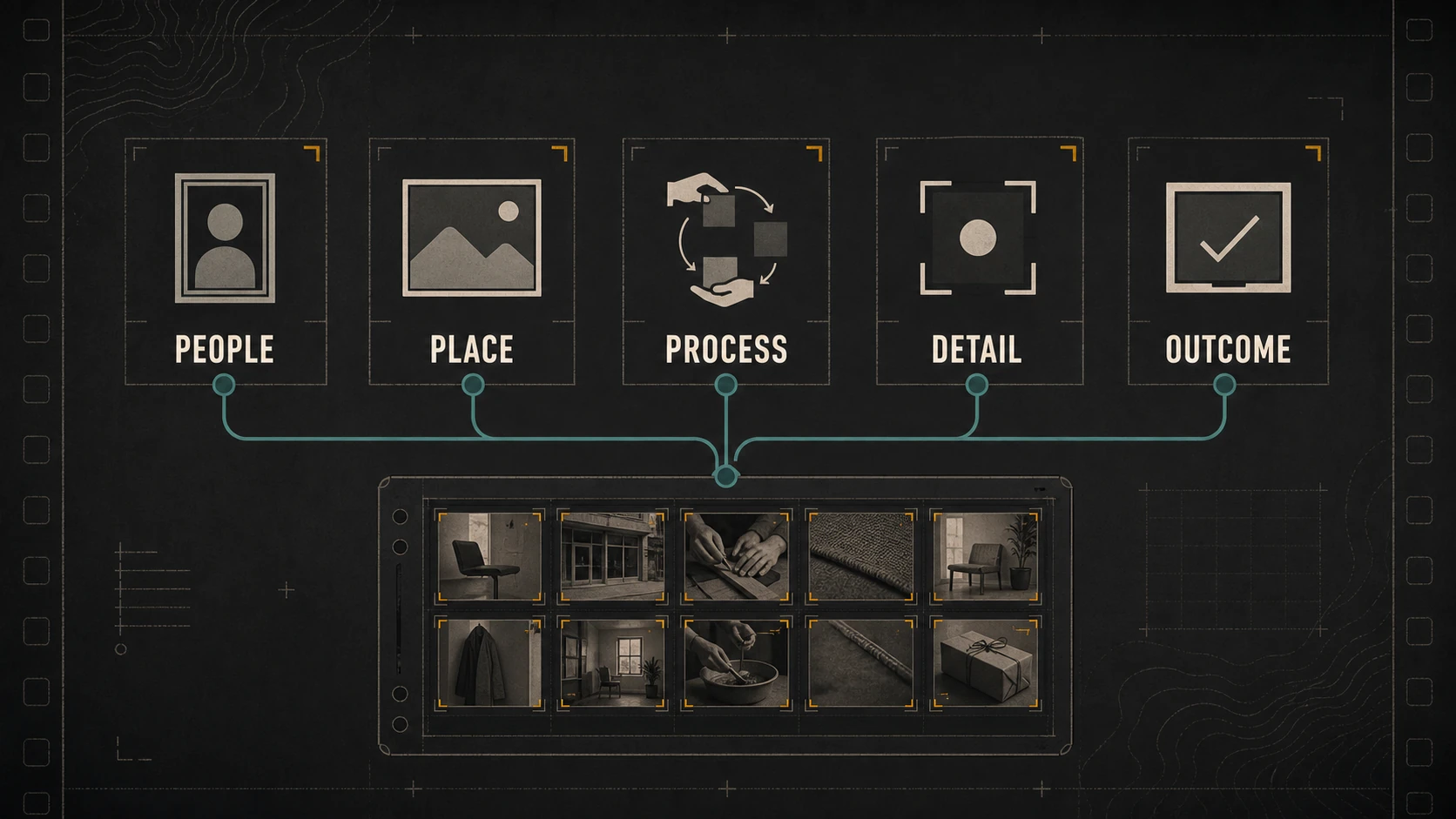
A useful business photo library is not a folder labeled “brand photos.” It is a set of original images the business can find, understand, approve, and place where customers need evidence.
The library should answer practical questions: Who does the work? Where does it happen? What does the process involve? Which details matter? What does a responsible outcome look like?
Sharpness and polish matter, but usefulness depends on coverage, context, permission, and maintenance.
Audit the Pages Before Planning New Photographs
Begin with the places where images are already used or missing:
- home page;
- service or product pages;
- about and team pages;
- location or service-area pages;
- work examples;
- articles and resources;
- proposals and sales materials;
- email;
- recruiting;
- and active social channels.
For each location, record:
| Page or use | Customer question | Current image | Gap |
|---|---|---|---|
| Service page | Is this service right for my situation? | Generic wide image | Real process and detail |
| About page | Who is responsible for the work? | Old group photo | Current individual and working portraits |
| Work example | What was actually done? | Finished result only | Context, process, and outcome sequence |
| Contact page | What happens next? | Decorative stock image | Real location or preparation cue |
This produces a coverage plan instead of a wish list for “more photos.”
Cover Five Useful Subjects
People
Show owners, team members, specialists, and customer-facing roles in ways that reflect how the business actually works.
Useful variations include:
- clear individual portraits;
- small groups;
- people working in the real environment;
- hands or gestures demonstrating a process;
- and natural interaction where permission is established.
Do not stage unsafe, inaccurate, or performative work for the camera.
Place
Show the physical context customers need: exterior, entrance, workspace, service area, landscape, interior, access, or arrival.
A place photograph should do more than decorate the page. It can help someone recognize the business, understand scale, prepare for a visit, or see where work occurs.
Process
Document meaningful stages, decisions, preparation, quality controls, handoffs, and cleanup.
Avoid an endless sequence of similar action images. Capture the steps that explain why the work is dependable or what the customer should expect.
Detail
Details can show material, condition, workmanship, interface, packaging, texture, labeling, or a relevant comparison.
Record what the detail depicts while the context is fresh. A close image without notes may become impossible to explain later.
Outcome
Show completed work, delivered products, prepared spaces, or the state after a service.
Use honest angles and labels. Do not imply a before-and-after relationship unless the images genuinely document the same subject and relevant conditions.
Build Complete Visual Sequences
One useful subject usually needs more than one frame.
Use a sequence:
- wide context;
- medium relationship or action;
- close detail;
- human scale where appropriate;
- clean outcome;
- and one variation with layout space.
This resembles the way a hiker or field photographer records a route: the overlook shows the terrain, but the trail junction and surface detail explain how the route actually works.
The reusable content shoot guide turns page needs into shot families, formats, permissions, and a capture brief.
Separate Evidence From Decoration
An informative image contributes meaning. A decorative image supports atmosphere or composition without adding necessary information.
That distinction affects placement and alternative text. The W3C Images Tutorial explains that informative images need text alternatives conveying essential information, while purely decorative images should use a null alternative so they do not create noise for assistive technology.
Write alt text in the context of the page:
- Describe what the image contributes.
- Do not repeat a nearby caption word for word.
- Do not stuff keywords.
- If the image is a link or control, describe its function.
- If the image contains complex information, provide that information in nearby text.
The same photograph may need different alt text—or be decorative—in different contexts.
Plan Formats Without Creating Endless Copies
Keep one high-quality approved master and create exports for defined uses.
Typical needs include:
- wide website banner;
- landscape content image;
- portrait or vertical crop;
- square-safe crop;
- small responsive derivative;
- and print or proposal export where required.
Do not enlarge a weak file or create dozens of unidentified versions. Use consistent suffixes:
202607_project_subject_context_master.ext
202607_project_subject_context_web-wide.ext
202607_project_subject_context_social-vertical.ext
For web delivery, choose dimensions and compression that preserve the useful detail without sending unnecessarily large files. Google’s image SEO guidance recommends relevant surrounding text, descriptive filenames, high-quality images, and responsive delivery practices.
Store Context With the Image
Every approved asset needs enough information to be used responsibly.
Record:
| Field | Purpose |
|---|---|
| Subject | What or who appears |
| Date | When it was captured |
| Place or project | Enough context to identify the work |
| Creator | Who made the image |
| Rights | Ownership, license, credit, and restrictions |
| Permissions | People, property, customer, or location approval |
| Approved uses | Website, social, sales, internal, or restricted |
| Description | What the image shows or proves |
| Review date | When accuracy and permission should be checked |
| Status | Master, approved select, export, superseded, or retired |
The U.S. Copyright Office notes that the person who takes an original photograph is generally its initial copyright owner, while works made for hire may be treated differently. Review its guidance for photographers and obtain qualified advice for contracts or disputed rights.
Possession of a file does not establish permission to use it everywhere.
Use a Findable Library Structure
Choose a structure the responsible team can maintain.
photo-library/
  people/
  place/
  process/
  detail/
  outcome/
  projects/
  rights-and-releases/
  retired/
Folders alone are not enough when one image fits several subjects. A simple asset register can connect the filename to service, location, people, use, rights, and review status.
The Library of Congress publishes personal digital archiving resources covering formats and descriptions for digital photographs. For a business, preservation also means controlled access, multiple copies, recovery responsibility, and a method for retiring outdated public exports.
Decide When Stock Images Are Acceptable
Stock imagery can fill a decorative or conceptual gap. It should not imply that a model is an employee, a generic property is the business location, or another company’s work is the business’s proof.
Use stock carefully when:
- the image is clearly illustrative;
- the license supports the intended use;
- the page does not need local or operational evidence;
- and the surrounding copy does not misrepresent the subject.
Use original images when identity, place, process, product, workmanship, condition, or outcome matters.
Connect Images to Customer Questions
An asset becomes valuable when it helps a person understand the page.
Examples:
- A team portrait supports the name, role, and responsibility described nearby.
- A process detail supports an explanation of what happens during service.
- A location image supports arrival or access instructions.
- A product sequence supports selection, scale, or use.
- A finished result supports a documented work example.
Avoid image galleries with no interpretation. Place the strongest image near the relevant text and explain what deserves attention.
Review the Library on a Schedule
Every quarter, review high-visibility images and active exports.
Retire or reshoot when:
- a person no longer represents the business;
- uniforms, signage, products, facilities, or services changed;
- an image shows an outdated or unsafe practice;
- permission or licensing is unclear;
- the file no longer meets technical needs;
- the image appears so often that every page feels identical;
- or a current customer question has no useful visual evidence.
Keep historical originals according to the retention policy, but remove superseded public assets from active publishing folders.
A Hypothetical Library Build
Consider a local professional service business with a home page, three service pages, an about page, and a small work section.
Its audit finds generic service images, an outdated portrait, and finished-project photos with no process context.
The first library build prioritizes:
- current portraits and working interactions;
- one complete visual sequence for each service;
- place and arrival details;
- process and quality-control evidence;
- documented outcomes;
- rights and descriptions for every select;
- and exports for the exact page layouts.
The business does not need thousands of images. It needs sufficient, current coverage for the decisions its pages ask customers to make.
The Bottom Line
A small-business photo library should cover people, place, process, detail, and outcome. Each image should retain its context, rights, permission, description, approved uses, and review status.
Audit the pages first. Fill evidence gaps deliberately. Keep masters separate from exports. Write contextual alt text. Retire outdated visuals. The result is a library that makes the website and content system clearer instead of merely more decorated.
Dark Monkey Media connects visual libraries to website content and operational workflows. If the business already has years of photographs but no reliable way to find or approve them, start by mapping the smallest useful library.