
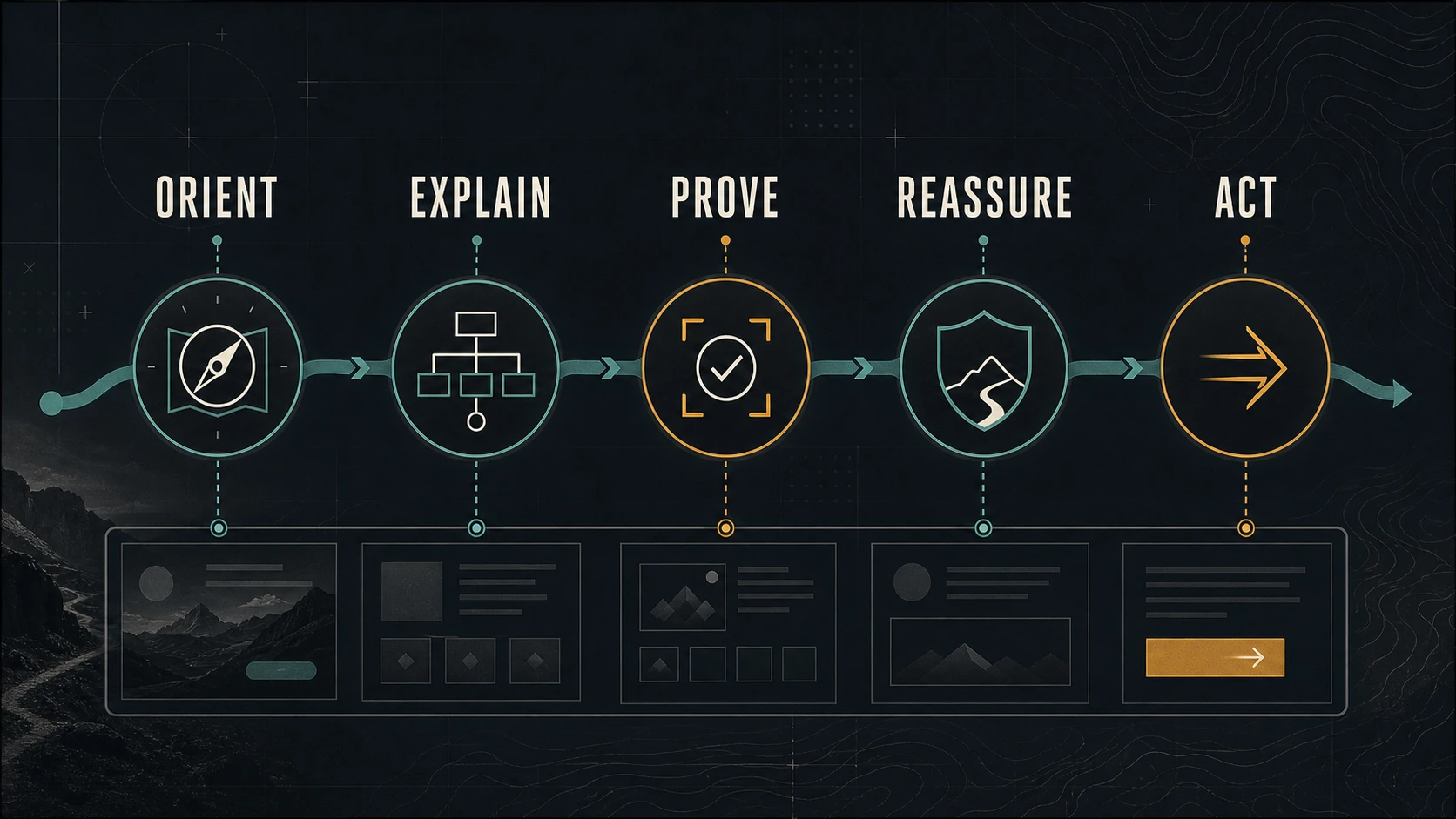
Visual content should help a visitor understand the business, evaluate its evidence, and move through the page. It should not operate as a separate layer of decoration.
A photograph, diagram, or video earns its place when it answers a question more clearly than copy alone, supports a claim the page actually makes, or prepares the visitor for a sensible next step.
The website provides the structure. The visual library provides evidence and orientation. Social posts, email, and campaigns can introduce pieces of that evidence, but the owned page should preserve the complete explanation.
Give Every Visual a Page Role
Five roles cover most useful website visuals.
Orient
Help the visitor understand place, scale, subject, or starting context.
Examples include:
- a real exterior or entrance;
- an establishing view of a property or project;
- a labeled interface overview;
- a product shown at human scale;
- or a simple diagram of the process ahead.
Orientation should reduce uncertainty, not create cinematic delay before the page becomes useful.
Explain
Show a sequence, relationship, condition, choice, or process that would take more words to describe.
The surrounding text should identify what the viewer should notice. An unexplained process photograph may be meaningful to the team and opaque to the customer.
Prove
Support a factual claim with real, relevant evidence.
Proof may include:
- documented work;
- a product detail;
- a before-and-after pair with comparable conditions;
- a screen or system outcome;
- a team member performing a real responsibility;
- or a location customers can verify.
Do not use generic stock imagery as evidence of the business’s people, property, process, or results.
Reassure
Reduce a specific concern about preparation, access, safety, cleanliness, quality control, privacy, or what happens next.
Reassurance works when the image is paired with a clear statement. A smiling portrait is not a substitute for explaining the process a customer is worried about.
Act
Help the visitor recognize and complete the next step.
This might be a visual cue near a booking option, a diagram that prepares someone for a form, a product view linked to selection, or a location image next to directions.
The image should support the action, not compete with it.
Map Roles to Page Questions
Start with the page, not the asset folder.
| Page | Primary question | Useful visual role | Next step |
|---|---|---|---|
| Home | Am I in the right place? | Orient and prove | Choose a service or path |
| Service | Is this right for my situation? | Explain and reassure | Review fit or request service |
| About | Who is responsible? | Prove and reassure | Understand the team |
| Work example | What was done and what does it show? | Orient, explain, prove | Explore the related service |
| Contact | What happens after I reach out? | Reassure and act | Complete the appropriate form |
This map reveals two common problems: pages with attractive media that answers no question, and important questions with no visual evidence.
Build the Page Before Choosing the Hero
A hero image is not the website strategy.
Define:
- audience and situation;
- page promise;
- questions the page must answer;
- evidence the business can support;
- next step;
- and measurement.
Then select or capture visuals for the gaps.
Google’s people-first content guidance emphasizes original information, clear sourcing, first-hand expertise, and a satisfying answer for the intended audience. Visuals should strengthen those qualities rather than make a thin page look finished.
Connect the Asset Library to the Website Inventory
The small-business photo-library guide organizes coverage around people, place, process, detail, and outcome. The website inventory adds another layer: which page, question, claim, and action each approved asset supports.
Maintain a simple mapping:
| Asset | Subject | Page role | Approved pages | Status |
|---|---|---|---|---|
| Exterior wide | Current location and entrance | Orient | Home, contact | Current |
| Process detail | One quality-control step | Explain, prove | Service, work example | Current |
| Team portrait | Named service owner | Prove, reassure | About, service | Review annually |
| Aerial layout | Property relationship | Orient, explain | Location page | Restricted use |
The mapping prevents two failures: strong assets disappearing in storage and one familiar image being repeated across every page.
Use Video Where Motion or Sequence Matters
Video is justified when motion, timing, sound, sequence, or spatial change contributes meaning.
Use a short video to:
- show how a process begins;
- demonstrate movement or operation;
- establish arrival or scale;
- explain a decision in a person’s own verified words;
- or compare stages that cannot be understood from one frame.
Prefer a still image or diagram when it communicates the point faster.
Provide user control. Avoid forcing sound. Add captions for speech and relevant audio, and provide a transcript or nearby text when the information must remain accessible outside the player.
Large background video can delay the page and make text harder to read. The visual effect is not worth hiding the offer or degrading the customer path.
Write Contextual Alt Text and Captions
The same asset may have different roles on different pages.
The W3C Images Tutorial explains that text alternatives depend on whether an image is informative, decorative, functional, or complex.
For an informative image:
- describe the essential information it contributes;
- keep the description tied to the page context;
- avoid phrases such as “image of” unless they add meaning;
- do not repeat adjacent text unnecessarily;
- and move complex explanation into visible page copy.
A caption can add date, place, process, limitation, or interpretation for everyone. Alt text is not a hidden SEO caption.
Preserve Page Performance
Visual content must arrive in a usable form.
For each image:
- choose dimensions appropriate to the layout;
- provide responsive variants;
- compress without destroying relevant detail;
- reserve width and height to reduce layout movement;
- use a suitable modern format where supported;
- and lazy-load images that are not needed immediately.
Keep the primary page visual strong, but do not send the original production file to every visitor.
Google’s image SEO guidance recommends high-quality images near relevant text, descriptive context, and responsive image practices. Those choices help discovery and make the page more coherent for people.
Connect Campaigns Back to Complete Pages
Social posts and email can isolate one useful observation:
- a process detail;
- a customer question;
- a location update;
- a project condition;
- or a short explanation.
The destination page should provide the complete context, current offer, limitations, evidence, and next step.
Do not send campaign traffic to a generic home page when a specific service or guide answers the question. Do not create a landing page that contradicts the main website.
The local-business social media plan organizes channel material into Explain, Answer, Show, and Invite. The website remains the source that those shorter pieces can point toward.
Measure the Action the Page Supports
Choose a primary action for the page.
Examples include:
- a qualified form submission;
- a booking;
- a call from the relevant service page;
- a visit to the next decision page;
- a document request;
- or another action tied to the page promise.
Google Analytics allows an important interaction to be marked as a key event. Use measurement to evaluate the whole path, not to claim that one photograph caused the outcome.
Diagnostic questions include:
- Did visitors reach the evidence section?
- Did they continue to the relevant service or contact path?
- Which customer questions still appear?
- Does the page load and remain readable on mobile?
- Is the video played because it is useful or because the copy is incomplete?
- Is an asset being reused where it remains relevant?
The review should produce a decision: keep, improve, move, replace, or retire.
A Hypothetical Integration Example
Consider a local service business with one priority: improve the quality of inquiries for a complex service.
The page needs to explain fit, preparation, process, limitations, and the request step.
The integrated visual plan uses:
- an orienting image showing the real service environment;
- a three-frame process sequence;
- one detail supporting a quality-control explanation;
- a named team image tied to responsibility;
- a short clip only where motion clarifies the process;
- and a visual cue near the request requirements.
The social plan extracts one question or detail at a time and links back to the full page. Measurement checks qualified requests and the questions customers still ask.
No asset is expected to “convert” by itself. The page, evidence, offer, and response process work together.
Maintain the Connection
Review page-to-asset mappings when:
- services, people, locations, products, or offers change;
- a new campaign creates a different audience or promise;
- permissions or licenses change;
- the same visual appears across too many unrelated pages;
- performance or accessibility suffers;
- or the customer questions have moved on.
Update the page and library together. Removing an obsolete service statement while leaving the old process image in place creates a new contradiction.
The Bottom Line
Visual content supports a small-business website when it performs a defined role: orient, explain, prove, reassure, or help someone act.
Map the page questions first. Use original evidence responsibly. Add context and accessible alternatives. Protect performance. Connect shorter campaigns to complete owned pages. Measure the customer path and maintain the asset-page relationship over time.
Dark Monkey Media approaches websites, visual libraries, and publishing as connected content systems and digital operations. If the media and website currently tell different stories, map one page and its evidence before commissioning more assets.