
A small-business marketing system is the repeatable path from a business priority to a customer-facing message, a published asset, a measurable action, and the next informed decision.
It is not a stack of subscriptions. It is not a calendar filled with arbitrary posting dates. It is not an automation that generates more material than anyone can review.
The minimum useful system answers seven questions:
- What are we trying to change?
- What do customers need to understand?
- What source material do we already have?
- Who creates and approves the work?
- Where will it be published?
- How can it be reused responsibly?
- What signal will tell us what to do next?
If the owner cannot answer those questions without searching several inboxes and documents, marketing is still being carried by memory.
Start With One Business Priority, Not a Channel
The U.S. Small Business Administration’s guide to marketing and sales treats the marketing plan as the action layer beneath the business strategy. It connects the target market, competitive advantage, sales process, goals, channels, budget, and review.
That is a better starting point than “we need to post more.”
Choose one priority for the next operating cycle:
- explain a service that buyers regularly misunderstand;
- generate better-qualified inquiries;
- support a seasonal offer;
- build proof around completed work;
- improve local visibility for one service area;
- or answer a question that repeatedly slows the sales conversation.
A priority should be specific enough to guide choices. “Increase awareness” does not tell anyone what to make. “Help commercial property managers understand our emergency response process before they request service” does.
If the larger customer path or operating problem is still unclear, first review what a Digital Operations Review examines. If the problem is known but the investment case is uncertain, use the four-part digital operations investment test.
Build a Customer-Question Map
Once the priority is clear, list the questions a buyer must answer before taking the next step.
Useful groups include:
Fit
- Is this service intended for a business like mine?
- Which locations, project types, or situations are supported?
- When is this service not the right choice?
Process
- What happens after I contact the business?
- What information should I prepare?
- How long does a normal step take?
Risk
- What commonly goes wrong?
- What does the business do to reduce that risk?
- Which conditions require another specialist?
Proof
- What has the business built, documented, photographed, or learned?
- Can the claim be supported without exaggeration?
- What should remain an internal example rather than a client claim?
Decision
- What is the next responsible action?
- What should the buyer compare?
- When should the buyer wait?
This map becomes the editorial backlog. It is more durable than a list of catchy post ideas because each item exists to remove a real point of uncertainty.
Google’s guidance for people-first content emphasizes original information, complete answers, clear sourcing, and first-hand expertise. A customer-question map helps a small business stay anchored to those standards instead of producing search-shaped filler.
Create a Source-of-Truth Content Inventory
The next step is not drafting. It is finding the evidence.
Create one inventory for material the business can responsibly use:
- approved service descriptions;
- process notes and checklists;
- frequently asked questions from real conversations;
- original photographs and video;
- screenshots and diagrams;
- public reviews or testimonials with usage approval;
- internal build notes that can be safely translated into a field note;
- measurements with a documented method and date;
- and primary external references for factual claims.
Each item needs enough context to prevent misuse:
| Field | What to record |
|---|---|
| Topic | The customer question or business priority it supports |
| Source | Where the information or asset came from |
| Owner | Who can verify and approve it |
| Usage | Website, article, social, email, proposal, or internal only |
| Rights | Whether publication and reuse are allowed |
| Review date | When accuracy or permission should be checked again |
For images, think like a photographer managing a working archive. A strong frame is not useful if nobody can find the original, identify the subject, confirm the usage right, or understand what it proves.
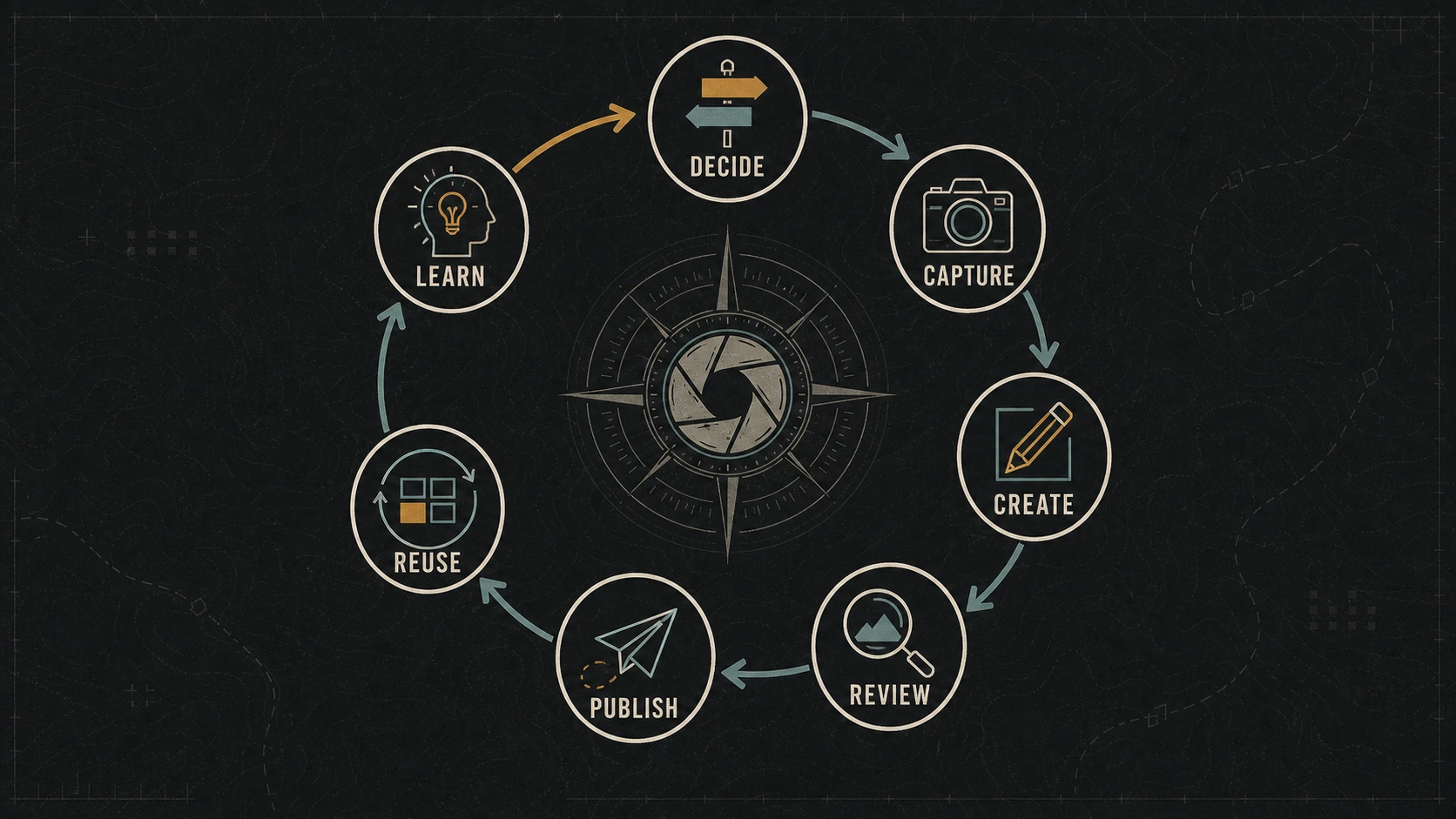
Use a Seven-Stage Marketing Operating Loop
The system becomes operational when every item moves through visible stages.
1. Decide
Select the business priority, audience, customer question, desired action, owner, and due date. Reject work that has no defined reader or purpose.
2. Capture
Gather the approved facts, examples, images, links, and constraints before writing. Record missing evidence instead of filling the gap with generic language.
3. Create
Build the primary asset in the format that best answers the question: service-page update, article, comparison, field note, email, video, or visual guide.
4. Review
Check accuracy, usefulness, voice, claims, permissions, links, accessibility, and the next action. Human review remains responsible for what the business publishes.
5. Publish
Release the primary asset with its final title, metadata, media, internal links, measurement, and owner. Confirm the public result instead of assuming the editor preview matches production.
6. Reuse
Adapt the approved source into channel-appropriate pieces. A useful article may support a short email, several social observations, a sales answer, and an updated service-page link. Reuse the underlying evidence—not the same caption everywhere.
7. Learn
Review the signals, customer responses, sales questions, and maintenance needs. Decide whether to improve, expand, consolidate, or stop the work.
The loop ends with a decision, not a dashboard.
Assign Ownership Without Building a Large Team
One person may fill several roles, but the roles should still be named.
| Role | Responsibility |
|---|---|
| Priority owner | Chooses the business outcome and resolves tradeoffs |
| Evidence owner | Confirms facts, examples, permissions, and constraints |
| Creator | Produces the primary asset |
| Reviewer | Approves accuracy, voice, and release readiness |
| Publisher | Handles metadata, links, media, scheduling, and public validation |
| Measurement owner | Reviews the selected signals and records the next decision |
In a one-person business, the owner may perform every role at different moments. Writing the roles down still helps because it prevents “creating” and “approving” from becoming one rushed action.
For a small team, avoid approval mazes. One accountable reviewer is usually more useful than a group chat where everyone can comment but nobody can close the work.
Choose a Cadence the Business Can Maintain
Consistency means the system produces dependable decisions—not that every channel receives the same number of posts.
A realistic monthly rhythm might be:
- Choose one priority and three to five customer questions.
- Capture one batch of source material.
- Create one substantial primary asset.
- Publish supporting updates across the most relevant channels.
- Review inquiries, key events, search visibility, and new customer questions.
- Maintain or retire outdated material.
The cadence should match available evidence and review capacity. A business with one useful case, five original photographs, and an owner who can review for an hour should build around those constraints. Pretending to operate a daily media desk will usually create lower-quality work and a backlog of unfinished drafts.
Measure the Action the System Is Supposed to Support
Choose one primary signal and a small number of diagnostic signals.
The primary signal might be:
- a qualified form submission;
- a scheduled consultation;
- a purchase;
- a phone call from a service page;
- an email signup tied to a useful resource;
- or another action connected to the stated priority.
Google Analytics allows an important interaction to be marked as a key event and reported across the channels that contributed to it. That makes the measurement more useful than treating every page view as equal.
Diagnostic signals can help explain the result:
- which landing page started the path;
- whether readers reached the relevant service page;
- which questions still appear in inquiries;
- whether the content earns useful search impressions;
- whether the asset is being reused;
- and whether the workflow is staying within its time budget.
Do not collect a metric unless someone knows what decision it can influence.
A Minimum Viable Marketing System
A small business does not need a complex platform to begin. It needs a controlled loop.
| Component | Minimum viable version |
|---|---|
| Priority | One business outcome for the next 30 days |
| Audience | One defined buyer or customer situation |
| Question map | Three to five questions tied to the priority |
| Inventory | One approved folder or list for facts and assets |
| Workflow | Seven visible stages with one owner per stage |
| Primary asset | One complete page, article, guide, email, or video |
| Distribution | Two or three channels chosen for relevance |
| Measurement | One key action plus a few diagnostic signals |
| Review | One scheduled decision meeting or owner review |
That system can run in a shared document, task board, or spreadsheet. Software becomes useful when it supports the loop without hiding ownership or creating more maintenance.
A Worked Example
Consider a hypothetical local service company preparing for a seasonal maintenance offer.
The weak approach is to schedule twelve generic promotional posts.
The system approach is:
- Choose the priority: generate better-qualified seasonal maintenance inquiries.
- Map buyer questions: timing, scope, preparation, pricing factors, and situations that need repair rather than maintenance.
- Capture evidence: technician notes, approved service language, original photographs, service-area details, and the intake requirements.
- Create the primary asset: a service guide that answers the five questions and points to the correct request form.
- Review claims, images, accessibility, form fields, routing, and measurement.
- Publish supporting email and social pieces that each answer one question and link to the guide.
- Measure qualified submissions, record new questions, and revise the guide before the next cycle.
The example does not require a large content volume. It requires one connected path and enough evidence to make the path credible.
Maintain the System
Every month:
- close or reschedule stalled work;
- remove duplicate ideas;
- verify links and public offers;
- review new customer questions;
- check whether the measurement still matches the priority;
- and document one decision from the results.
Every quarter:
- consolidate overlapping content;
- refresh the inventory and permissions;
- review ownership and access;
- identify the assets producing useful customer or search activity;
- and retire processes the business no longer needs.
A system earns its keep by becoming easier to operate and more informed over time. If it only accumulates drafts, dashboards, and subscriptions, it is not a marketing system. It is storage.
The Bottom Line
A useful small-business marketing system connects one priority to customer questions, approved evidence, a visible workflow, relevant distribution, a measurable action, and a scheduled next decision.
Start smaller than your ambition. One well-run operating loop will teach you more than a complicated calendar nobody can maintain.
Dark Monkey Media uses its owned brands as working system examples and helps businesses build practical content systems and digital operations. If your current marketing depends on scattered files and last-minute decisions, the first useful project is to document one complete loop.